
Best AI coding agents for reducing software maintenance costs in 2026 — six tools compared on pricing, ROI, and real maintenance tasks for small businesses.
Why AI Coding Agents Are a Game-Changer for Software Maintenance in 2026
Software maintenance devours 60–80% of total lifecycle costs according to Carnegie Mellon's SEI research. For small businesses running lean dev teams, that translates to thousands of hours annually spent on bug fixes, dependency upgrades, and legacy refactoring instead of shipping features. As of May 2026, AI coding agents have crossed a critical threshold: they autonomously execute multi-step maintenance workflows — triaging error logs, generating patches, running tests, and opening pull requests — without a human writing a single line of code. The shift from autocomplete copilots to agentic coders means a two-person dev shop can now handle maintenance loads that previously required four or five engineers.

Top 6 AI Coding Agents Compared: Features, Pricing, and ROI

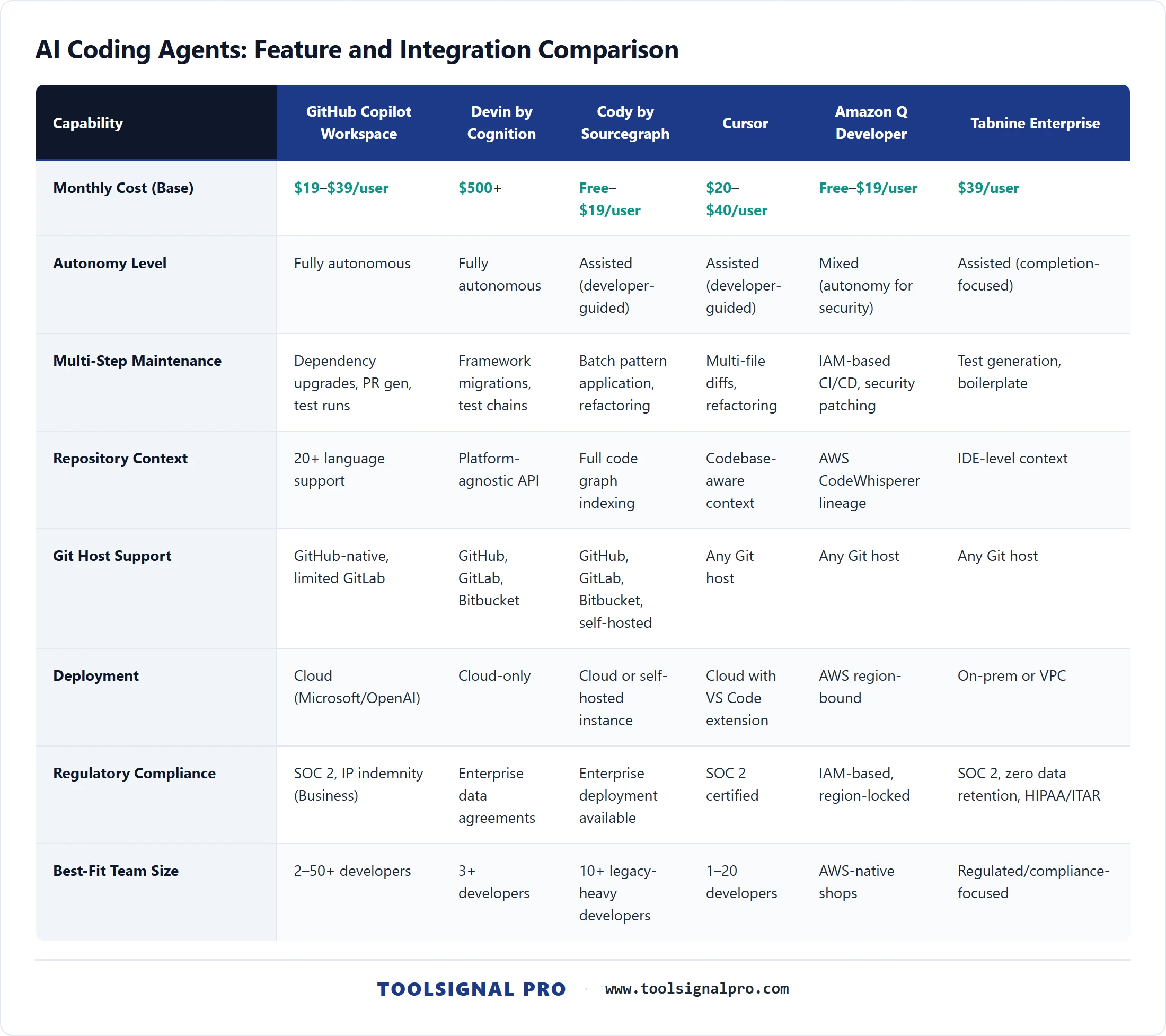
Here is how the six leading AI coding agents stack up as of May 2026, based on published vendor pricing and documented capabilities. Pricing reflects current listed rates from each vendor's official site.
- GitHub Copilot Workspace — $19/user/mo (Individual) or $39/user/mo (Business). Best for teams already on GitHub. Autonomous multi-file PR generation, dependency upgrade agents, native Actions CI integration. Supports 20+ languages. Estimated 30–45% reduction in maintenance hours per GitHub's published productivity data.
- Cursor — $20/user/mo (Pro), $40/user/mo (Business). Best for hands-on developers who want deep IDE control. Multi-file agentic edits with inline diff review, strong codebase-aware context. VS Code fork with native feel. Excels at refactoring but requires more developer steering than fully autonomous agents.
- Devin by Cognition — Usage-based pricing starting around $500/mo for teams. Best for delegating entire maintenance tickets end-to-end. Fully autonomous agent with its own browser, terminal, and editor. Handles complex multi-step tasks like migrating frameworks or resolving chains of failing tests.
- Amazon Q Developer — Free tier available; Pro at $19/user/mo. Best for AWS-heavy shops. Strong at infrastructure-as-code maintenance, security scanning, and Java/.NET modernization. Deep integration with AWS services and CodeWhisperer lineage ensures broad language support.
- Tabnine Enterprise — $39/user/mo. Best for regulated industries needing code-privacy guarantees. On-premises deployment option, zero data retention, SOC 2 compliant. Maintenance capabilities are more assisted than autonomous — strong at test generation and code completion, weaker at multi-step agentic fixes.
- Cody by Sourcegraph — Free tier; Enterprise at $19/user/mo. Best for large legacy codebases. Entire-repository context awareness via Sourcegraph's code graph. Excels at explaining unfamiliar legacy code, generating targeted fixes, and batch-applying patterns across thousands of files.
How Each AI Coding Agent Handles Real Maintenance Tasks
Four scenarios matter most for small-business maintenance: dependency upgrades, bug triage from error logs, test generation for legacy code, and security patching. GitHub Copilot Workspace and Devin lead in autonomous multi-step execution — both can take a Dependabot alert, generate the upgrade, run tests, and open a PR without human input. Cursor and Cody perform best in assisted mode where a developer reviews diffs in real time, making them stronger for nuanced legacy refactoring. Amazon Q Developer dominates security patching on AWS stacks, automatically remediating findings from CodeGuru and Inspector. Tabnine's strength is narrower: it generates unit tests reliably and completes boilerplate, but it cannot autonomously orchestrate multi-file fixes.
Integration, Security, and Team Workflow Fit
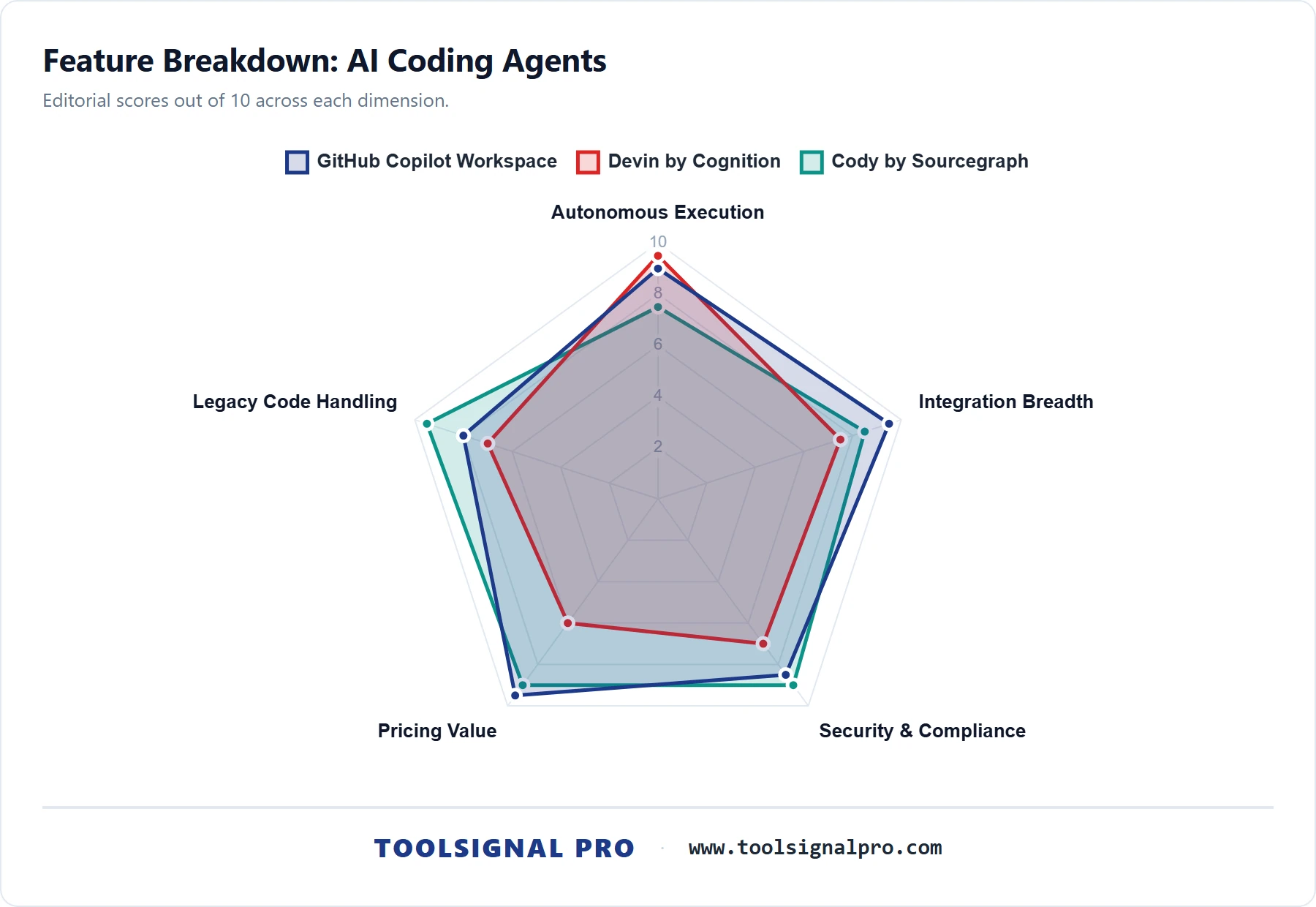
- GitHub Copilot Workspace — GitHub-native; seamless Actions CI/CD. Limited GitLab support. Code processed by Microsoft/OpenAI cloud. Business tier adds IP indemnity and policy controls.
- Cursor — VS Code-compatible extensions and keybindings. Works with any Git host. Cloud-processed with SOC 2 certification. No on-prem option currently.
- Devin — Platform-agnostic; connects to GitHub, GitLab, Bitbucket via API. Cloud-only. Enterprise contracts include data handling agreements. Overkill for teams under three developers.
- Amazon Q Developer — Deep AWS, JetBrains, and VS Code integration. IAM-based access controls. Data stays within AWS region. Ideal fit for shops already running CI/CD on CodePipeline or CodeBuild.
- Tabnine Enterprise — On-premises or VPC deployment; zero external data transmission. JetBrains, VS Code, Neovim support. The only option here for HIPAA-adjacent or ITAR-regulated codebases where code cannot leave your network.
- Cody by Sourcegraph — GitHub, GitLab, Bitbucket, and self-hosted repos via Sourcegraph instance. Enterprise deployment keeps code graph on your infrastructure. VS Code and JetBrains plugins. Strong fit for monorepo shops.
Calculating Maintenance Cost Savings: A Practical Framework
Use this formula to estimate annual ROI before committing to a subscription. Step 1: Multiply your developer count by average hours per week spent on maintenance (industry median is 12–15 hours). Step 2: Apply the tool's documented productivity gain — conservatively 25% for assisted tools (Cursor, Tabnine, Cody) and 35–45% for autonomous agents (Copilot Workspace, Devin, Amazon Q). Step 3: Multiply saved hours by your blended hourly developer cost (US average: $65–$85/hr for small-business contractors). Step 4: Subtract annual subscription cost. For a three-developer team spending 40 combined maintenance hours weekly at $75/hr, adopting GitHub Copilot Workspace at $39/user/mo saves roughly $58,500–$70,200 annually after the $1,404 subscription cost. Break-even arrives in under two weeks. Even Devin's higher price point (~$6,000/yr) breaks even within six weeks for the same team if it delivers its documented 40%+ autonomy rate on maintenance tickets.


Final Verdict: Which AI Coding Agent Saves You the Most in 2026
Best overall for cost-conscious small businesses: GitHub Copilot Workspace. At $39/user/mo on the Business plan, it delivers the strongest balance of autonomous maintenance capabilities, native GitHub integration, IP indemnity, and ecosystem momentum. Microsoft's distribution reach — Copilot is embedded in every GitHub repo, VS Code install, and Azure DevOps pipeline — means continuous improvement velocity outpaces competitors. For teams already on GitHub (which is most US small-business dev shops), the switching cost is zero and the ROI math is the most favorable of any tool reviewed here.
Best for legacy codebases: Cody by Sourcegraph. If your maintenance burden centers on a sprawling, poorly documented codebase, Cody's full-repository context graph is unmatched. It understands cross-file dependencies that other tools miss, making it the safest choice for large-scale refactoring and pattern-based fixes across thousands of files. At $19/user/mo for Enterprise, it is also the most affordable option for this use case. Best for solo developers: Amazon Q Developer's free tier — zero cost, solid security patching, and AWS-native CI/CD make it the no-brainer starting point for a one-person shop. Synthesis verdict: Pricing favors Copilot Workspace and Amazon Q. Mainstream adoption and market share momentum overwhelmingly favor Copilot Workspace — per GitHub's published metrics, it is the most widely adopted AI coding tool globally. Technical edge for autonomous multi-step fixes goes to Devin, but its price point and complexity make it impractical for most small businesses. Integration ecosystem, marketing reach, and compounding adoption all stack in Copilot Workspace's favor. ToolSignal's pick for 2026 and into 2027 is GitHub Copilot Workspace — the dimensions that compound (pricing accessibility, adoption network effects, Microsoft's integration muscle) all reinforce its lead. Before paying, verify one thing: confirm your codebase's primary languages are well-supported in Copilot's agent mode, and run the ROI formula above with your actual maintenance hours. If the math works — and for most teams it will — start with a 30-day Business trial this week.